
Team
Team of 5 MHCI graduate students.
Designed For
Child riders aged 5+ and parents/caregivers.
Timeline
6 Weeks | Oct. - Dec. 2025
My Role
Led the design of the child-facing mobile dashboard screens and contributed to research synthesis, ideation, and prototype testing,
Tools + Technologies
Interviews, Usability Testing, Think-alouds, Affinity Diagramming, Figma
Problem
Current scooter controls are confusing and unsafe for young riders and stressful for parents.
Hyundai’s Level 2 semi-autonomous scooter requires safe, intuitive controls for young riders to operate confidently. Current interactions around braking, signaling, and Auto/Manual mode transitions are confusing, hard to reach, or developmentally inappropriate, creating safety risks for children and stress for parents.
Solution
Physical and digital control system for safe, intuitive scooter rides.
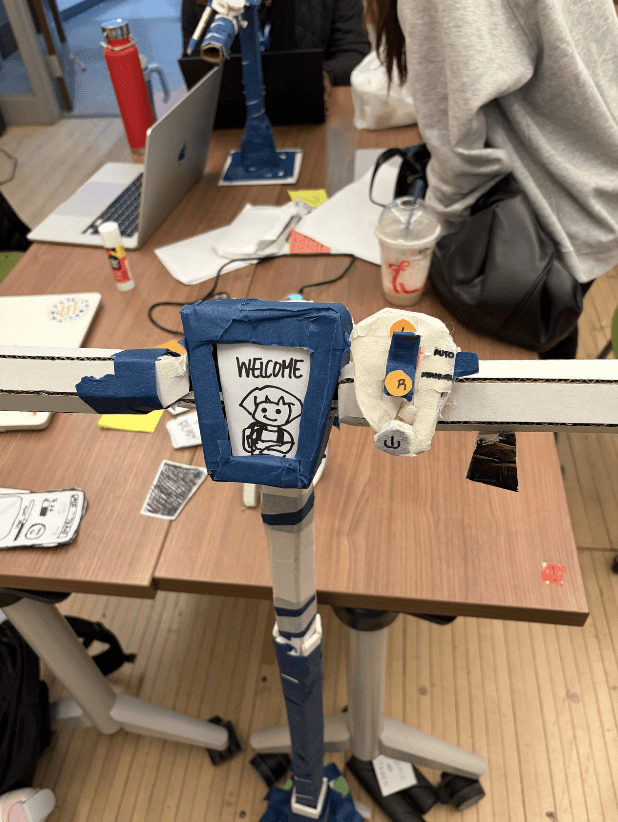
Final Physical Prototype


Scooter Dashboard (my main task for final prototyping)

Onboarding

Homescreen
Simulations & Parent App

Persona Focus
4th Grade Rider:
Kera, a young rider seeking independence, clarity and confidence building.

‼️
Kera's Needs
🧭 Clear, child-friendly explanations
🖱Large, easy-to-reach controls
🛟 Predictable feedback
User Interviews & Affinity Diagram
🛴
3 Riders
👨👩👧 Parent of a young rider
🧑 Adult who rode scooters as a child
🧑 Adult who rode scooters as a child

Design Opportunities (How Might We?)

Key insights were reframed into How Might We questions to guide design decisions.
Key Insights

Rapid Sketches

Rapid team sketching to explore multiple product directions rooted in our user insights.
Rapid Prototyping
We rapidly prototyped and A/B tested two interaction approaches to evaluate clarity, confidence, and safety feedback.
Prototype A - Screen-Based Interface 🖥️
Features:
On/Off
Manual / Auto mode
Brake control
Power switch
Visual feedback for status and safety

Prototype B - Screen-Free Interface 🔘

Features:
Button controls
Haptic feedback
Reduced visual complexity
Designed for quicker, eyes-free interaction
First Iteration of Paper Screens

Scooter screens (includes onboarding for first-time riders)

Parent app screens (Parent Mode)
Think-Aloud Testing
Design must align with a child’s developmental model
Think-aloud participants showed that children struggled with car-based metaphors, dense controls, and precision actions.

Design Features
👍 Thumb-accessible controls that avoid fine-motor precision
👀 Visual icons paired with simple language
🧭 Distributed controls across handlebars to reduce right-side overload
🔐 Non-skippable onboarding to establish safe habits early
Design Concepts
Stakeholders Considerations
🚦
Visible Turn Signals
Pedestrians, teachers, and other riders predict Kera's movement
🧭
Predictable Behavior
Auto-braking in congested areas builds community trust
👀
Clear Indicators
Battery, mode, and speed visibility help adults supervise safely
Autonomy with Oversight
Two-way rider-parent communication
Subtle parent notifications
Clear feedback on changes


Auto vs Manual Mode
Auto Mode:
Obstacle detection, speed control, auto-brake, manual override
Manual Mode:
Full control for confident riders; supports autonomy and skill building
Onboarding screens

Each screen presents one simple idea at a time, keeping the experience within a child’s working-memory limits. Arrow icons clearly signal what action is possible and what will happen next, reducing uncertainty and hesitation.
Simulation Screens

Warnings and titles are placed top-center with high contrast so key messages are seen before details.
Scooter Dashboard & Rewards

Primary controls are large, close, and easy to reach, supporting quick, safe interaction while moving.
Setbacks
Screen Scaling Mismatch

Late in the process, we discovered that my Figma screens did not display as expected when mapped to the scooter-mounted phone. I rapidly resized and adjusted layouts and flows to fit the physical screen constraints.
ESP32

We explored using an ESP32 with an external screen to simulate the scooter interface, but display clarity and system instability limited usability.
Main Insight
Children seek independence, while adults seek control; effective design balances both without burdening either.
Outcomes
We successfully demoed ScootEasy, a child-centered scooter prototype that users found intuitive, engaging, and enjoyable to test.


Next Steps
🔧 Prototype with production-grade hardware to validate screen clarity, responsiveness, and real-world usability
👧 Test with child riders across age ranges to refine controls, language, and safety feedback
📈 Evaluate long-term autonomy and safety through repeated-use and Parent Mode progression testing

